How to Embed Issuu Publications on Your Shopify Store with EmbedAny

Are you looking to showcase your Issuu publications directly on your Shopify store? Digital catalogs, lookbooks, magazines and other publications can significantly enhance your customer experience. This guide will show you exactly how to embed any Issuu content on your Shopify store in just a few simple steps.
What is Issuu?
Issuu is a digital publishing platform that converts PDFs into flipbooks, digital magazines, catalogs and other interactive publications. Embedding these publications directly on your Shopify store can help customers explore your product offerings without leaving your website.
Step-by-Step Guide to Embedding Issuu Content
Step 1: Install EmbedAny on Your Shopify Store
Before you can embed Issuu content, you’ll need to install EmbedAny:
- Visit EmbedAny in the Shopify App Store
- Click “Add app” and follow the installation instructions
- Complete the activation process as prompted
Step 2: Find Your Issuu Publication Link
- Go to your Issuu account and open the publication you want to embed
- Click the “Share” button
- Copy the direct URL of your publication (it should look like
https://issuu.com/filenameorusername/docs/publicationname)
Step 3: Embed Your Issuu Publication
Now for the magic part:
- Go to the page or product where you want to display your Issuu publication
- In the editor, paste the Issuu URL you copied
- Select the pasted URL and make it italic (use the italic button or press Ctrl+I)
- Save your changes
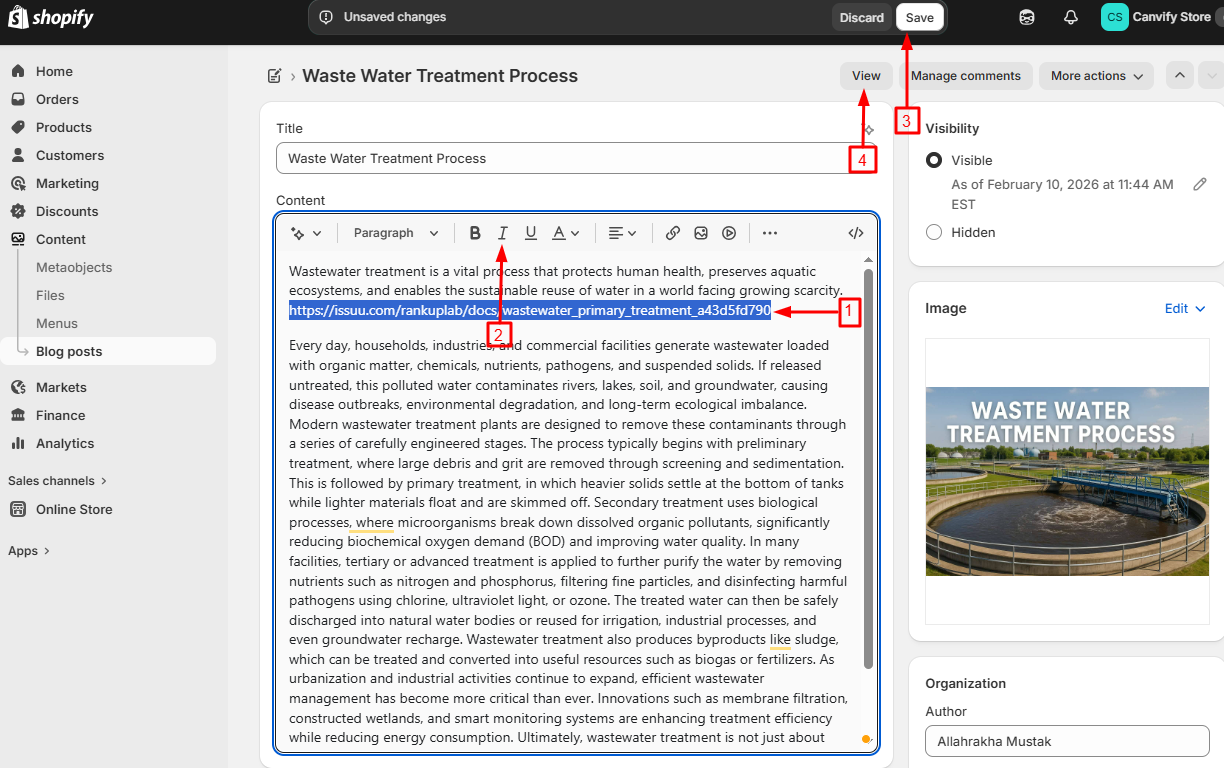
That’s it! Your Issuu publication will now appear as an interactive flipbook directly on your page.

Where to Embed Issuu Publications on Your Shopify Store
Issuu publications work brilliantly in several areas of your store:
- Product descriptions: Add digital catalogs showing your product in use
- About Us pages: Share company brochures or media kits
- Blog posts: Embed magazines or lookbooks related to your content
- Custom pages: Create a dedicated resources section with your publications
Why Embed Issuu Content?
Adding Issuu publications to your Shopify store helps:
- Keep customers engaged on your site longer
- Showcase product catalogs in an interactive format
- Present professional, multi-page content without PDFs
- Improve your content marketing with magazine-style content
- Give customers a more immersive shopping experience
Troubleshooting Tips
If your Issuu publication isn’t displaying correctly:
- Make sure you’ve properly italicised the link
- Check that you’re using the correct publication URL
- Verify that EmbedAny is properly activated on your store
With EmbedAny, embedding Issuu publications on your Shopify store becomes incredibly simple. No coding knowledge required - just paste, italicise, and watch your content come to life!