How to Embed Instagram Posts on Shopify: A Simple Guide Using EmbedAny

Want to showcase Instagram posts on your Shopify store? Adding Instagram content to your product pages, blog posts, or any other part of your store can significantly boost engagement and provide social proof. This guide will show you how to embed Instagram posts on Shopify in just a few simple steps using EmbedAny.
Step 1: Install the EmbedAny App
Before you can start embedding Instagram posts, you’ll need to install the EmbedAny app on your Shopify store:
- Visit EmbedAny on the Shopify App Store
- Click “Add app” to install it to your store
- Follow the installation prompts to activate the app
Step 2: Find the Instagram Post You Want to Embed
Now that you have EmbedAny installed and activated, you’ll need to:
- Go to Instagram and find the post you want to embed
- Click on the three dots (⋯) in the top-right corner of the post
- Select “Copy Link” to get the URL of the post
This copied link is what you’ll use to embed the Instagram post on your Shopify store.
Step 3: Add the Instagram Post to Your Shopify Store
With the Instagram post link copied, you can now add it to your store:
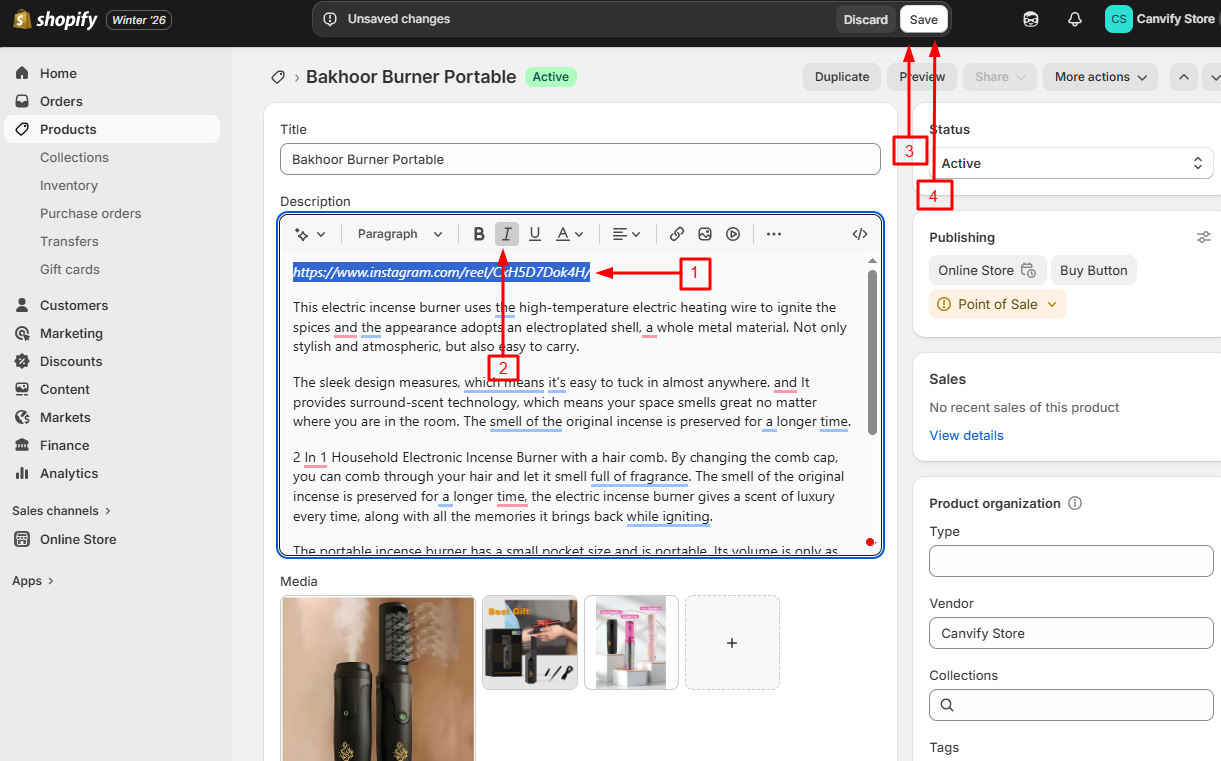
- Go to the admin panel of your page, product, or section where you want to add the Instagram post
- Paste the Instagram link into the text editor
- Italicise the link by selecting it and clicking the italic button (or using keyboard shortcuts: Ctrl+I or Cmd+I)
- Save your changes
That’s it! EmbedAny will automatically convert the italicised Instagram link into a fully interactive Instagram post when your page loads.
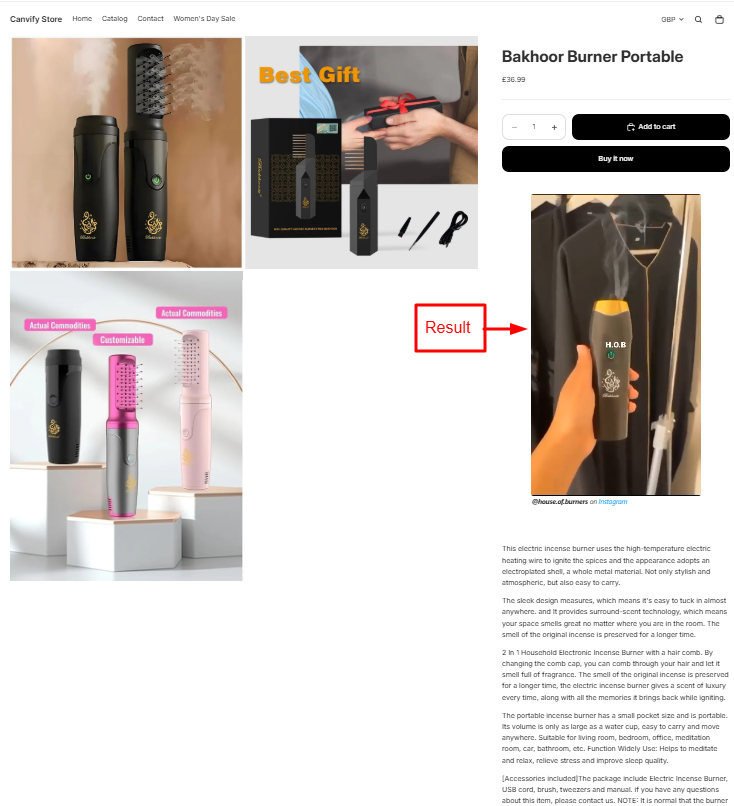
Where Can You Embed Instagram Posts?
You can add Instagram posts to various sections of your Shopify store:
- Product descriptions
- Blog posts
- Custom pages
- Collection descriptions
- Homepage sections
Why Embed Instagram Posts on Your Shopify Store?
- Social Proof: Show customers how real people are using your products
- Customer Reviews: Encourage your happy customers to post a video review on Instagram and embed it on your store. It will build trust with your potential customers.
- Fresh Content: Keep your store updated with new content from your Instagram feed
- Engagement: Give visitors more ways to interact with your brand
- Visual Appeal: Make your store more visually interesting with Instagram’s photos and videos
Tips for Embedding Instagram Posts
- Choose posts that showcase your products in action
- Mix user-generated content with your own posts
- Update embedded content regularly to keep your store fresh
- Select posts that match your brand’s aesthetic
By following these simple steps, you can easily incorporate Instagram content into your Shopify store, creating a more engaging shopping experience for your customers without any coding or technical skills needed.